Dikuasakan oleh Blogger.
  • Home
  • Author
  • Tutorial
    • Blog Tutorial
    • Blogskin Tutorial
    • Photoshop Tutorial
  • Freebies
  • Blogskin
ig shop fanpage instagram

I N F I N I T E


Assalamualaikum :)
4 days didnt have internet connection .. me was like :
SMASHiNGYOURS | via Tumblr

p/s: Infinite new song [24 hours] is so nice TT__TT

Share
Tweet
Pin
Share
3 Comments

Infinite Last Romeo Giveaway by Fiqa Nsz

KLIK BANNER untuk menyertai giveaway ini!

Special Thanks to:

Para sponsor giveaway ini iaitu Mr. Cupid, Anis Nadzirah, NARA Kpop Online Shop, Karimah Zulkafali, Aliatul Aiman dan Keyranazleen. Giveaway ini dianjurkan oleh Fiqa Nsz

Jangan lepaskan peluang untuk merebut hadiah menarik yang ditawarkan!
Top Refferal bakal membawa pulang hadiah album Infinite Last Romeo [official original album],
Cabutan bertuah pula mencari seramai 16 pemenang untuk merebut hadiah seperti MP3 shuffle, Infinite Replica Jersey, Infinite special limited edition badges, Infinite badge, Notebook, Infinite Key Holder dan topup!

Giveaway ini berlansung selama sebulan iaitu dari 15 May sehingga 15 Jun 2014.
Jom sertai sekarang sebelum terlambat!
KLIK SINI UNTUK KE LINK GIVEAWAY!

Share
Tweet
Pin
Share
11 Comments


Assalamualaikum :)

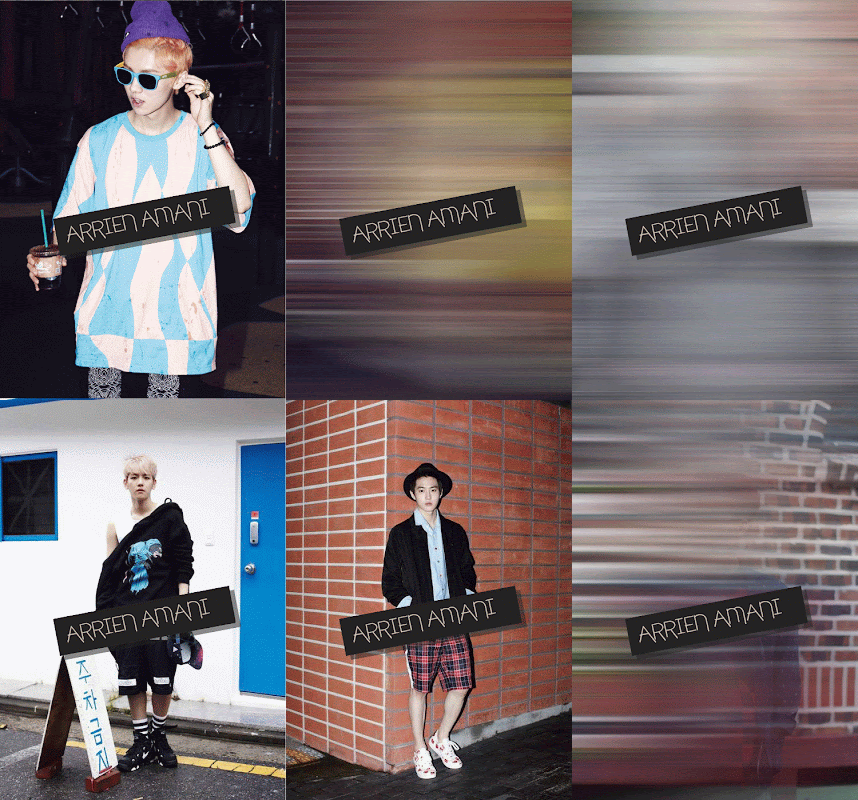
Exo will come back with GROWL. haha so i make this tuto with their teaser photo. Nak siapkan gif nie memang rumit coz maklumlah 12 member,so 12 pic..megambil masa juga la :D Make sure awak ikut tuto ini betul-betul and tidak tertinggal sebarang step oke :)\

1. Open your Ps (Tak kira Ps berapa pun)
2. Then make sure Ps korang ada Animation Frame. Kalau takde, pergi ke Window > Animation.
3. Open your picture.
4. On your layer 1,click right > Duplicate Layer > oke.


5. Next,click dekat layer 1 copy,lepas itu click Filter > Blur > Motion Blur > oke.


6. Kemudian click kembali pada layer 1,then korang click Duplicate Selected Frame sebanyak sekali sahaja. So Frame ke-2 akan keluar. Tak faham? rujuk gambar bawah nie.


7. Repeat step 4 and 5 for other pic.
8. But untuk layer 2 nie korang click Duplicate Selected Frame sebanyak 2 kali. so akan keluar frame ke-3 and 4.


Now step untuk set gambar di frame 1,2,3,4. This step agak merumitkan. So ikut betul-betul yea :)
9. Click on Frame 1 and hide layer 2,3,4. How to hide layer 2,3,4? oke u just click on eye at layer 2,3,4.


10. Then on frame 2, hide layer 3 and 4. On Frame 3, hide layer 1,2 and 4. And on Frame 4,hide layer 1 and 2.
11. Oke now change the time on frame 1(frame picture) to 0.5 sec. 


12. Next on Frame 2 (frame motion blur) set the time to 0.2 sec.


13. Repeat set the time on frame 3 and 4.
14. Kalau awak hendak banyak lagi gambar, just repeat step 7-13. Macam arrien,arrien buat 12 gambar.
15. Now untuk save, go to File > Save for Web & Device > Save.


16. So,inilah hasilnye. :D


Good Luck ^_^ * Sorry kalau bahasa gila rojak XD*

Share
Tweet
Pin
Share
4 Comments


Large

Assalamualaikum :)

Today exo is comeback ^^. LOL arrien sangat excited oke.. hehe here freebies blogskin XOXO yang dijanjikan. Thankz to unnie ayuni for the basecode. I already credit her,so don remove the credit oke.please be honest people :) so comment first before take okey ^_-

| LIVE PREVIEW | CODE |

Share
Tweet
Pin
Share
38 Comments


Large

Assalamualaikum :)

Come back give freebies icon,selepas lama berhenti bagi freebies. huhu,Lame ker?? ada lah dalam 3 weeks?? haha.oke now freebies Exo XOXO icon. Sorry kalau buruk :D Comment dahulu sebelum ambil oke *Haram ambil tanpa comment ^_^*
Do not Re-freebies | Re-Post!!


Share
Tweet
Pin
Share
11 Comments


Assalamualaikum ;)

Hye BANA!! B1A4 is now comeback!! " What's happened " LOL so fun their Mv..  BANA dah tengok MV comeback diaorang? HAha comel sangat.. 


Semalam dah tukar gambar untuk CBox coz rasa semalam comeback nye,bwt hari nie batu jumpa MV diaorang,tu pun kat FB.. haha. lawak lah jugak MV nie,ala-ala macam patung jer muka diaorang tu,walaupun memang ada yang pakai openg patung, -_-"

Large

Satu lagi yang kelakarnye coz gaya diaorang and cara pemakaian diaorang, memang smart lah comeback diaorang kali nie walaupun tema ala-ala sama macam beautiful target iaitu tema ala budak gila2 sikit, bwt comel :p hehe

Large

Bwt mungkin kalau korang dengar lagu comeback diaorang nie agak pelik sikit rentak dia tu,haha (bagi pendapat arrien lah,as a bana oke XD) tpi.. urmm tak tahu nak cakap apa dah,yang sure sangat excited dengan comeback diaorang nie.. LOL :D


*see macam patung kan jinyoung oppa saya>>?* hehe


Share
Tweet
Pin
Share
No Comments


263416_439377486110415_468523770_n_large

Assalamualaikum :)

Blogskin Be My Girl!!.. Dibuat sempena comeback B1A4 this May!!
Excited and memang tak sabar untuk tunggu bulan 5,But i'm exam oke, ?!! Harap-harap comeback mereka tak kena tarikh arrien exam.. hehe. This basecode dari skin arrien -> Nothing's over just arrien tambah header and ubah navigate. But i think tema dye bukanlah B1A4 bwt them maknae, gongchan.
Hope u all like this ^_^ Please leave your comment before download code oke ;)
DONT  REMOVE THE CREDIT,OR I KILL U!!


Live Preview | Code


Share
Tweet
Pin
Share
25 Comments
Older Posts

About me

DmPRDCbQC2A/WJoToqY-gPI/AAAAAAAAAL8/CMgWRh6OFVoy7elrJJWlL1dnOuMsrmrrQCLcB/s1600/about.jpg"
/ />

Aenean sollicitudin, lorem quis bibendum auctor, nisi elit conseat ipsum, nec

sagittis sem nibh id elit. Duis sed odio sit amei.

FOLLOWER

Follow Me

  • IG shop
  • facebook
  • instagram

recent posts

Blog Archive

  • ▼  2019 (3)
    • ▼  Mei (1)
      • Salam Ramadhan 2019!
    • ►  April (1)
    • ►  Januari (1)
  • ►  2018 (11)
    • ►  Oktober (1)
    • ►  Mei (3)
    • ►  April (4)
    • ►  Januari (3)
  • ►  2017 (9)
    • ►  Mei (1)
    • ►  April (6)
    • ►  Februari (1)
    • ►  Januari (1)
  • ►  2016 (20)
    • ►  November (10)
    • ►  Oktober (6)
    • ►  September (1)
    • ►  Ogos (1)
    • ►  Julai (1)
    • ►  Februari (1)
  • ►  2015 (40)
    • ►  Oktober (1)
    • ►  September (2)
    • ►  Julai (1)
    • ►  Jun (6)
    • ►  Mei (4)
    • ►  April (7)
    • ►  Mac (10)
    • ►  Februari (6)
    • ►  Januari (3)
  • ►  2014 (38)
    • ►  Disember (5)
    • ►  November (2)
    • ►  Oktober (1)
    • ►  Jun (5)
    • ►  Mac (3)
    • ►  Februari (6)
    • ►  Januari (16)
  • ►  2013 (358)
    • ►  Disember (49)
    • ►  November (45)
    • ►  Oktober (25)
    • ►  September (13)
    • ►  Ogos (38)
    • ►  Julai (24)
    • ►  Jun (34)
    • ►  Mei (32)
    • ►  April (21)
    • ►  Mac (27)
    • ►  Februari (24)
    • ►  Januari (26)
  • ►  2012 (135)
    • ►  Disember (37)
    • ►  November (37)
    • ►  Oktober (21)
    • ►  September (8)
    • ►  Ogos (12)
    • ►  Julai (4)
    • ►  Jun (2)
    • ►  Mei (6)
    • ►  April (2)
    • ►  Mac (2)
    • ►  Januari (4)
  • ►  2011 (3)
    • ►  Disember (3)
Facebook Twitter Instagram Pinterest Bloglovin
FOLLOW ME @iena_inspirit97

Created with by ThemeXpose | Distributed By Gooyaabi Templates