Dikuasakan oleh Blogger.
  • Home
  • Author
  • Tutorial
    • Blog Tutorial
    • Blogskin Tutorial
    • Photoshop Tutorial
  • Freebies
  • Blogskin
ig shop fanpage instagram

I N F I N I T E


Assalamualaikum :)

Hye,First GA by Atiqah Jaidin & Arrien Amani telah pun berlangsung. Korang dah join belum?? belum?? click { JOIN } to join oke :D so disebabkan ada yang request psd colouring nie jadi arrien post :) Actually PSD nie dah buat lama,sebelum arrien hiatus lagi. Tapi disebabkan arrien hiatus hari tu,so barulah arrien boleh post hari nie ^_^
This is my own artwork,so don't copycat!! :)
| DOWNLOAD PSD | 

Tak Tahu cara nak guna?? Rujuk TUTORIAL PSD ini ^_^

Share
Tweet
Pin
Share
5 Comments

MYUNGSOO | via Tumblr
Assalamualaikum :)

Disebabkan masuk kali nie arrien bukak Ask.fm arrien,ada dua orang yang tanya, Psd colouring tu apa??. so arrien ambil keputusan untuk explainkan. hehe :D Tapi apa yang arrien terangkan ini berdasarkan fahaman arrien ye :)

Oke like this, PSD colouring ialah satu document colour yang kita guna untuk mengubah warna gambar asal ke warna dalam document tu. Seperti ini :


Nampak tak perbezaan antara dua gambar tu, before & after. That means gambar asal seperti di before tu and then,selepas kita tambah psd colouring tu dye akan menjadi seperti di after. PSD Colouring nie juga bertujuan untuk mencantikkan gambar. Korong boleh download bermacam-macam jenis PSD Colouring dari blog,or tumblr. Sangat banyak jenis PSD Colouring nie, ada yang untuk cerahkan gambar,ada yang untuk gelapkan gambar and macam-macam lah :D Kalau korang tak tahu nak guna,boleh rujuk TUTO nie ^_^

Oke yang tu je lah yang arrien boleh explainkan berdaras apa yang arrien hafam,hope membantu. Kalau ada apa-apa just tanya di Ask.Fm oke. Seelok-eloknye kalau tanya soalan tu,tinggalkan link blog sekali oke ^_-

Share
Tweet
Pin
Share
No Comments


Assalamualaikum :)

Morning! actually this is my first time making a PSD Coloring.  I do follow my own kretiviti. Look at the picture,U see the difference right?? oke itulah effect nye. Hope u like it ^^ 
Credit to me if u use it!!

| DOWNLOAD PSD |

Tak tahu nak guna??
View This Tuto:

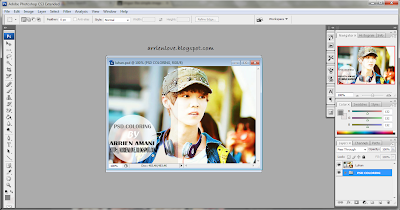
1. Open the download PSD in PS. {do not mind the PS 3 or 5, but I use PS 3}.


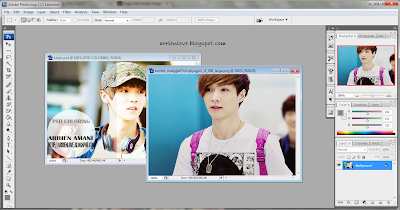
2. Then, open another picture.


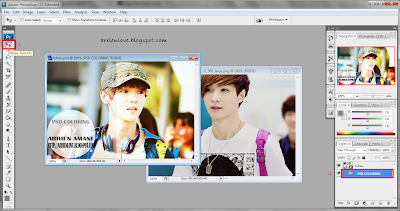
3. Chosee Move Tool (1) and drag file Luhan(2) from pic Luhan. (Sila rujuk gambar kalau tidak faham)


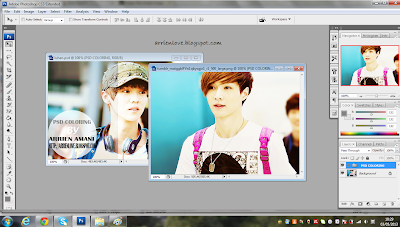
4. Drag Luhan file to picture u open earlier. it will see the difference at the picture. 


5. Oke done,after that u can save ur pic and maybe upload into ur tumblr?? hehe enjoy it :D


Share
Tweet
Pin
Share
No Comments
Older Posts

About me

DmPRDCbQC2A/WJoToqY-gPI/AAAAAAAAAL8/CMgWRh6OFVoy7elrJJWlL1dnOuMsrmrrQCLcB/s1600/about.jpg"
/ />

Aenean sollicitudin, lorem quis bibendum auctor, nisi elit conseat ipsum, nec

sagittis sem nibh id elit. Duis sed odio sit amei.

FOLLOWER

Follow Me

  • IG shop
  • facebook
  • instagram

recent posts

Blog Archive

  • ▼  2019 (3)
    • ▼  Mei (1)
      • Salam Ramadhan 2019!
    • ►  April (1)
    • ►  Januari (1)
  • ►  2018 (11)
    • ►  Oktober (1)
    • ►  Mei (3)
    • ►  April (4)
    • ►  Januari (3)
  • ►  2017 (9)
    • ►  Mei (1)
    • ►  April (6)
    • ►  Februari (1)
    • ►  Januari (1)
  • ►  2016 (20)
    • ►  November (10)
    • ►  Oktober (6)
    • ►  September (1)
    • ►  Ogos (1)
    • ►  Julai (1)
    • ►  Februari (1)
  • ►  2015 (40)
    • ►  Oktober (1)
    • ►  September (2)
    • ►  Julai (1)
    • ►  Jun (6)
    • ►  Mei (4)
    • ►  April (7)
    • ►  Mac (10)
    • ►  Februari (6)
    • ►  Januari (3)
  • ►  2014 (38)
    • ►  Disember (5)
    • ►  November (2)
    • ►  Oktober (1)
    • ►  Jun (5)
    • ►  Mac (3)
    • ►  Februari (6)
    • ►  Januari (16)
  • ►  2013 (358)
    • ►  Disember (49)
    • ►  November (45)
    • ►  Oktober (25)
    • ►  September (13)
    • ►  Ogos (38)
    • ►  Julai (24)
    • ►  Jun (34)
    • ►  Mei (32)
    • ►  April (21)
    • ►  Mac (27)
    • ►  Februari (24)
    • ►  Januari (26)
  • ►  2012 (135)
    • ►  Disember (37)
    • ►  November (37)
    • ►  Oktober (21)
    • ►  September (8)
    • ►  Ogos (12)
    • ►  Julai (4)
    • ►  Jun (2)
    • ►  Mei (6)
    • ►  April (2)
    • ►  Mac (2)
    • ►  Januari (4)
  • ►  2011 (3)
    • ►  Disember (3)
Facebook Twitter Instagram Pinterest Bloglovin
FOLLOW ME @iena_inspirit97

Created with by ThemeXpose | Distributed By Gooyaabi Templates